Table of Contents
.console
$p.console (in-page console)
This module enables console logging to an in-page element. It is somewhat simplified, as not all browser console features can easily be replicated, but should still suit most common use-cases.
This module is widely used on the test pages to show what is happening, without the need to open the browser console.
Initialisation
To use, you first have to put a target element on the page where the logging can be directed to:
<div id="console"></div>
In this example, a <div> with the ID “console” is created. The type of the element or the ID are arbitrary (can be any block-level element), but for all examples (including the sample CSS file), a <div> element with this ID is assumed.
In the JavaScript code, the setTarget() method must be used to set this element as the target for the logging.
A good place for this initialization is the module’s init() method, which can be implemented as follows:
$p.console.init = function() {
   this.setTarget(document.getElementById('console'))
}
After this, $p.console can be used in much the same way as the built-in browser console can be used, e.g.:
$p.console.log("Hello world!");
$p.console.info("Information item.");
$p.console.warn("Warning message!");
$p.console.error("Error message!");
$p.console.group('New group');
$p.console.log(["arrays","are","possible","too"]);
$p.console.groupEnd();
Methods
setTarget()
The setTarget() method should be used during initialization to define a target element that should be used for the console.
- Usage
- $p.console.setTarget(Element)
or: this.setTarget(Element) when used ininit() - Parameters
- Element – An object reference to an (existing!) element that should be used as the root element for the console (required)
log(), info(), warn(), error()
Write messages to the console. These work similar to their counterparts in the JavaScript console, except that they write the messages to the in-page element instead of the browser console.
- Usage
- $p.console.log(msg)
$p.console.info(msg)
$p.console.warn(msg)
$p.console.error(msg) - Parameters
- msg – The message to be written to the log – see below for allowed types (required)
The main difference is that at the moment each of these can only be called with a single message (the JS console can be called with multiple parameters), and that the output for objects is much simplified.
The message can be of the following types:
| Type | Behavior |
|---|---|
| String | Text is copied to the console “as is”. |
| Number | Number is copied to the console “as is”. |
| Array | If the Array.toHtml() method is available, a value table is displayed. Otherwise it is displayed as a serialized string. |
| Object | If the Object is of a type that can be serialized by JSON.stringify(), it will be displayed as a string. Otherwise it will be shown as [Object]. |
Hint: To log an error object (e.g. in a catch() block) to $p.console, please use '.toString()'' to turn it into a string first.
group()
Begins a log group, which is rendered as an expandable section of the log.
- Usage
- $p.console.group(title, open)
- Parameters
- title – A title string for the group (optional)
open – A boolean value to indicate if the group should be opened by default (optional, default = true)
groupEnd()
Ends a log group.
- Usage
- $p.console.groupEnd()
Screenshot
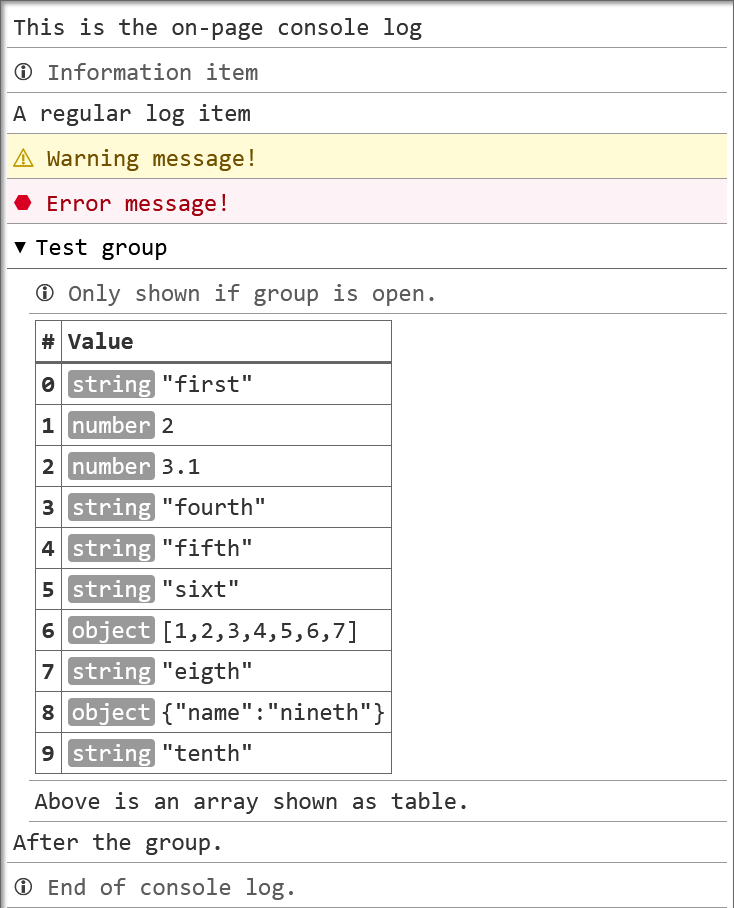
More information
- console on MDN.