.toHtml
<Array>.toHtml()
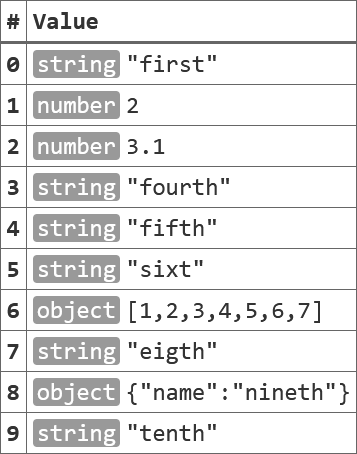
Returns an HTML table object representing the Array content.
This is used in the in-page Console tool.
- Usage
- any = Array.toHtml(attrlist)
- Member of:
- Array
- Parameters
- attrlist – a flat Object, containing a name-value pair of attributes to add to the
<table>element (optional). - Returns:
- A new table element with sub-element representing the content of the array.
Notes:
- The returned element structure does not have any style information. It is up to the page to provide styling for the table. Please see $p.console for an example how the table can be styled.
- The array values will be serialized using the JSON.stringify() method. Please see this function for limitations of this approach.
- The method uses .textContent to insert the values to the structure, which makes it safe to use HTML special characters such as
<,>or&in the array content.
Example
Given an array that is defined as follows:
const myArr = ["first", 2, 3.1, "fourth", "fifth", "sixt", [1,2,3,4,5,6,7], "eigth", {"name": "nineth"}, "tenth"];
The function creates a HTML structure as this:
<table>
 <thead>
  <tr><th>#</th><th>Value</th></tr>
 </thead>
 <tbody>
  <tr><th>0</th><td class="string">"first"</td></tr>
  <tr><th>1</th><td class="number">2</td></tr>
  <tr><th>2</th><td class="number">3.1</td></tr>
  <tr><th>3</th><td class="string">"fourth"</td></tr>
  <tr><th>4</th><td class="string">"fifth"</td></tr>
  <tr><th>5</th><td class="string">"sixt"</td></tr>
  <tr><th>6</th><td class="object">[1,2,3,4,5,6,7]</td></tr>
  <tr><th>7</th><td class="string">"eigth"</td></tr>
  <tr><th>8</th><td class="object">{"name":"nineth"}</td></tr>
  <tr><th>9</th><td class="string">"tenth"</td></tr>
 </tbody>
</table>
which could render (with additional CSS) as follows: